

Round-trip search is now available for flights departing on or after Tuesday, May 19, 2026.
* For itineraries of two or more segments that span Monday, May 18, 2026 and Tuesday, May 19, 2026, please make separate one-way reservations.
For passengers boarding on or before May 18, 2026, procedures can be completed through the Reservation and Service Center.
Online Check-in is available from 24 hours up to 20 minutes prior to your flight departure.
Please have your Reservation Number or e-Ticket number ready.
Online Check-InTraveling with an unaccompanied child
If a child is traveling alone, they must meet the applicable travel requirements.
Important Notes When Searching for Reservations Including Passengers with a Disability Certificate
IBEX Airlines offers a disability discount
for one passenger holding a disability certificate and up to one accompanying assistant.
When a reservation includes a passenger with a disability certificate, bookings can be made for up to two passengers in total.
For groups of three or more passengers, please make separate reservations.
<例>

Traveling as a party of four
A: Passenger with a disability
B: Accompanying assistant


Reservation for two passengers (A and B)
※Disability discount applied


Reservation for two passengers (C and D)
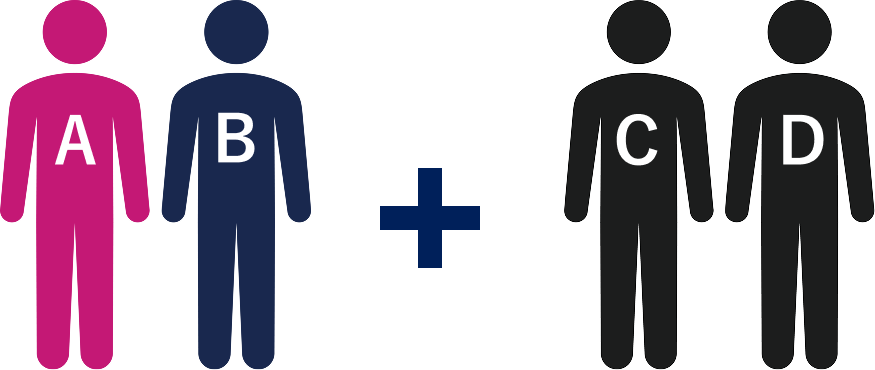
Reservation for two passengers (A and B)
※Disability discount applied
Reservation for two passengers (C and D)
A receipt or other proof of payment may be issued when you complete your payment.
If you require an invoice-compliant receipt, please issue it from Reservation Confirmation / Receipt Issuance on IBEX website.
After completing your payment, please be sure to keep your customer copy or receipt.
Your Reservation Number or e-Ticket Number is required when using Online Check-in or completing boarding procedures.
| Availability of Changes and Refunds After Convenience Store Payment | ||
|---|---|---|
| IBEX website | Reservation and Service Center | |
| Changes | IBEX website× | Reservation and Service Center〇 |
| Refunds * |
IBEX website× | Reservation and Service Center〇 |
Please contact the Reservation and Service Center to make changes.
Changes cannot be made through the website.
Please contact the Reservation and Service Center Reservation and Service Center to request a refund.
Refunds cannot be processed through the website.
Refunds will be made to your designated bank account in Japan. Please note that refunds cannot be made to bank accounts outside Japan.
Please allow approximately 10 days for your refund to be processed.
The bank transfer fee for refunds is the customer's responsibility.
However, if the refund is due to a flight cancellation or other disruption caused by IBEX, such as an aircraft maintenance issue, the bank transfer fee will be borne by IBEX.
| Convenience Store Brand | Payment Procedure |
|---|---|
| Seven-Eleven |
After payment, please be sure to receive and keep the Payment Receipt (Customer Copy).Your Reservation Number or e-Ticket Number is required when using Online Check-in. |
| LAWSON,MINISTOP,FamilyMart |
After payment, please be sure to receive and keep the Payment Receipt (Customer Copy).Your Reservation Number or e-Ticket Number is required when using Online Check-in. Multimedia Terminal Instructions |
| Daily YAMAZAKI, YAMAZAKI Daily Store |
After payment, please be sure to receive and keep the Receipt (issued in register receipt format).Your Reservation Number or e-Ticket Number is required when using Online Check-in. |
| Seicomart |
After payment, please be sure to receive and keep the Transaction Statement and Receipt.Your Reservation Number or e-Ticket Number is required when using Online Check-in. |
| Payment Procedure |
|---|
| Seven-Eleven |
After payment, please be sure to receive and keep the Payment Receipt (Customer Copy).Your Reservation Number or e-Ticket Number is required when using Online Check-in. |
| LAWSON,MINISTOP,FamilyMart |
After payment, please be sure to receive and keep the Payment Receipt (Customer Copy).Your Reservation Number or e-Ticket Number is required when using Online Check-in. 各マルチメディア端末の操作方法(ダミー仮設) |
| Daily YAMAZAKI, YAMAZAKI Daily Store |
After payment, please be sure to receive and keep the Receipt (issued in register receipt format).Your Reservation Number or e-Ticket Number is required when using Online Check-in. |
| Seicomart |
After payment, please be sure to receive and keep the Transaction Statement and Receipt.Your Reservation Number or e-Ticket Number is required when using Online Check-in. |